
CSS
按钮边款特效
字体显示控制
重置样式
......
# CSS特效
按钮边款特效
<!DOCTYPE html>
<html lang="en">

<head>
  <meta charset="UTF-8">
  <meta name="viewport" content="width=device-width, initial-scale=1.0">
  <title>css hover</title>
  <style>
    * {
      margin: 0;
      padding: 0;
    }

    .container {
      width: 100%;
      height: 100vh;
      display: flex;
      flex-direction: column;
      justify-content: center;
      align-items: center;
      background-color: #000;
    }

    a {
      position: relative;
      width: 100px;
      height: 60px;
      text-align: center;
      line-height: 60px;
      margin: 45px;
      text-decoration: none;
      color: aqua;
      font-size: 20px;
      padding: 0 20px;
      text-transform: uppercase;
      transition: 0.5s;
      overflow: hidden;
      -webkit-box-reflect: below 1px linear-gradient(transparent, #1113);
    }

    a::before {
      content: '';
      position: absolute;
      top: 0;
      left: 0;
      width: 20px;
      height: 20px;
      border-top: 2px solid aqua;
      border-left: 2px solid aqua;
      transition: 0.5s;
      transition-delay: 0.5s;
    }

    a::after {
      content: '';
      position: absolute;
      bottom: 0;
      right: 0;
      width: 20px;
      height: 20px;
      border-bottom: 2px solid aqua;
      border-right: 2px solid aqua;
      transition: 0.5s;
      transition-delay: 0.5s;
    }

    a:hover::before,
    a:hover::after {
      width: 100%;
      height: 100%;
      transition-delay: 0s;
    }

    a:hover {
      background-color: aqua;
      color: #000;
      box-shadow: 0 0 50px #21ebff;
      transition-delay: 0.3s;
    }

    a:nth-child(1) {
      filter: hue-rotate(150deg);
    }

    a:nth-child(3) {
      filter: hue-rotate(270deg);
    }

    a:nth-child(4) {
      filter: hue-rotate(400deg);
    }

    a:nth-child(5) {
      filter: hue-rotate(70deg);
    }
  </style>
</head>

<body>
  <div class="container">
    <a href="#">button1</a>
    <a href="#">button2</a>
    <a href="#">button3</a>
    <a href="#">button4</a>
    <a href="#">button5</a>
  </div>
</body>

</html>
1
2
3
4
5
6
7
8
9
10
11
12
13
14
15
16
17
18
19
20
21
22
23
24
25
26
27
28
29
30
31
32
33
34
35
36
37
38
39
40
41
42
43
44
45
46
47
48
49
50
51
52
53
54
55
56
57
58
59
60
61
62
63
64
65
66
67
68
69
70
71
72
73
74
75
76
77
78
79
80
81
82
83
84
85
86
87
88
89
90
91
92
93
94
95
96
97
98
99
100
101
102
103
104
105
106
107
108
109
2
3
4
5
6
7
8
9
10
11
12
13
14
15
16
17
18
19
20
21
22
23
24
25
26
27
28
29
30
31
32
33
34
35
36
37
38
39
40
41
42
43
44
45
46
47
48
49
50
51
52
53
54
55
56
57
58
59
60
61
62
63
64
65
66
67
68
69
70
71
72
73
74
75
76
77
78
79
80
81
82
83
84
85
86
87
88
89
90
91
92
93
94
95
96
97
98
99
100
101
102
103
104
105
106
107
108
109
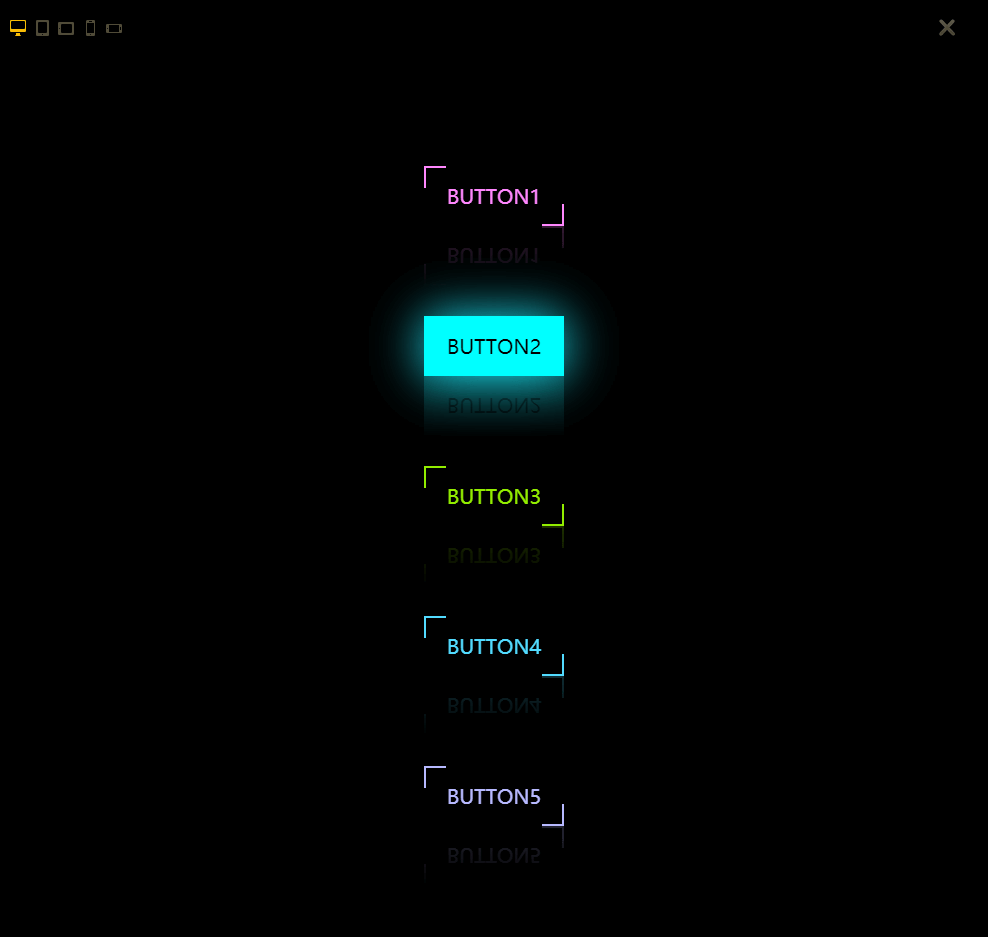
- 效果展示
# 字体显示控制
- 显示一行
/* 控制显示一行,多余部分...显示,添加width属性,可以控制单行宽度 */
overflow: hidden;  //文字溢出隐藏
text-overflow: ellipsis;  //文字超出部分用省略号代替
white-space: nowrap;  //文字不换行
1
2
3
4
2
3
4
- 控制显示多行
/**适用范围:因使用了WebKit的CSS扩展属性,该方法适用于WebKit浏览器及移动端;**/
display: -webkit-box; //将对象作为弹性伸缩盒子模型显示
-webkit-box-orient: vertical; //设置或检索伸缩盒对象的子元素的排列方式
-webkit-line-clamp: 3;  //一个块元素显示的文本的行数
overflow: hidden; //溢出隐藏
1
2
3
4
5
2
3
4
5
- 控制显示多行(利用伪类after)
p{position: relative; line-height: 20px; max-height: 40px;overflow: hidden;}
p::after{content: "..."; position: absolute; bottom: 0; right: 0; padding-left: 40px;
background: -webkit-linear-gradient(left, transparent, #fff 55%);
background: -o-linear-gradient(right, transparent, #fff 55%);
background: -moz-linear-gradient(right, transparent, #fff 55%);
background: linear-gradient(to right, transparent, #fff 55%);
}

/* 1.将height设置为line-height的整数倍,防止超出的文字露出。 */
/* 2.给p::after添加渐变背景可避免文字只显示一半。 */
/* 3.由于ie6-7不显示content内容,所以要添加标签兼容ie6-7(如:<span>…<span/>);兼容ie8需要将::after替换成:after */
1
2
3
4
5
6
7
8
9
10
11
2
3
4
5
6
7
8
9
10
11
# 重置样式
- 搜狐css初始化
/* 搜狐 */
body{font-family:"宋体","Arial Narrow",HELVETICA;text-align:center;margin:0 auto;padding:0;background:#FFF;font-size:12px;color:#333;}
div,form,ul,ol,li,span,p{margin:0;padding:0;border:0;}
img,a img{border:0;margin:0;padding:0;}
h1,h2,h3,h4,h5,h6{margin:0;padding:0;font-size:12px;font-weight:normal;}
ul,ol,li{list-style:none}
table,td,input{font-size:12px;padding:0}
a{outline-style:none;color:#333;text-decoration:none}
a:hover{color:#c00;text-decoration:underline;}
1
2
3
4
5
6
7
8
9
2
3
4
5
6
7
8
9
- 新浪css初始化
/* 初始化CSS */
html, body, ul, li, ol, dl, dd, dt, p, h1, h2, h3, h4, h5, h6, form, fieldset, legend, img { margin:0; padding:0; }
fieldset, img { border:none; }
img{display: block;}
address, caption, cite, code, dfn, th, var { font-style:normal; font-weight:normal; }
ul, ol { list-style:none; }
input { padding-top:0; padding-bottom:0; font-family: "SimSun","宋体";}
input::-moz-focus-inner { border:none; padding:0; }
select, input { vertical-align:middle; }
select, input, textarea { font-size:12px; margin:0; }
input[type="text"], input[type="password"], textarea { outline-style:none; -webkit-appearance:none; }
table { border-collapse:collapse; }
body { color:#333; padding:5px 0; font:12px/20px "SimSun","宋体","Arial Narrow",HELVETICA; background:#fff;/* overflow-y:scroll;*/ }
a { color:#666; text-decoration:none; }
a:visited { color:#666; }
a:hover, a:active, a:focus { color:#ff8400; text-decoration:underline; }
1
2
3
4
5
6
7
8
9
10
11
12
13
14
15
16
2
3
4
5
6
7
8
9
10
11
12
13
14
15
16
- 腾讯css初始化
body,ol,ul,h1,h2,h3,h4,h5,h6,p,th,td,dl,dd,form,fieldset,legend,input,textarea,select{margin:0;padding:0}
body{font:12px "宋体","Arial Narrow",HELVETICA;background:#fff;-webkit-text-size-adjust:100%}
a{color:#172c45;text-decoration:none}
a:hover{color:#cd0200;text-decoration:underline}
em{font-style:normal}
li{list-style:none}
img{border:0;vertical-align:middle}
table{border-collapse:collapse;border-spacing:0}
1
2
3
4
5
6
7
8
2
3
4
5
6
7
8
- 网易css初始化
html {overflow-y:scroll;}
body {margin:0; padding:0; font:12px/1.5 \5b8b\4f53,Arial,sans-serif;/*background:#ffffff;*/}
div,dl,dt,dd,ul,ol,li,h1,h2,h3,h4,h5,h6,pre,form,fieldset,input,textarea,blockquote,p{padding:0; margin:0;}
table,td,tr,th{font-size:12px;}
ol,ul {list-style:none;}
li{list-style-type:none;}
img{vertical-align:top;border:0;}
h1,h2,h3,h4,h5,h6{font-size:inherit; font-weight:normal;}
1
2
3
4
5
6
7
8
2
3
4
5
6
7
8
- 淘宝css初始化
body, h1, h2, h3, h4, h5, h6, hr, p, blockquote, dl, dt, dd, ul, ol, li, pre, form, fieldset, legend, button, input, textarea, th, td { margin:0; padding:0; }
body, button, input, select, textarea { font:12px/1.5tahoma, arial, \5b8b\4f53; }
h1, h2, h3, h4, h5, h6{ font-size:100%; }
address, cite, dfn, em, var { font-style:normal; }
code, kbd, pre, samp { font-family:couriernew, courier, monospace; }
small{ font-size:12px; }
ul, ol { list-style:none; }
a { text-decoration:none; }
a:hover { text-decoration:underline; }
sup { vertical-align:text-top; }
sub{ vertical-align:text-bottom; }
legend { color:#000; }
fieldset, img { border:0; }
button, input, select, textarea { font-size:100%; }
1
2
3
4
5
6
7
8
9
10
11
12
13
14
2
3
4
5
6
7
8
9
10
11
12
13
14