
Python
python下载腾讯,爱奇艺,优酷,土豆vip视频
......
第一步打开腾讯/爱奇艺/优酷/土豆,点击vip视频播放。
第二步复制网站视频播放的地址。
第三步打开全民vip视频在线解析(其他视频解析也行),粘贴视频地址,点击开始视频解析。
第四步解析成功之后,按下F12,你会看到如下图所示。
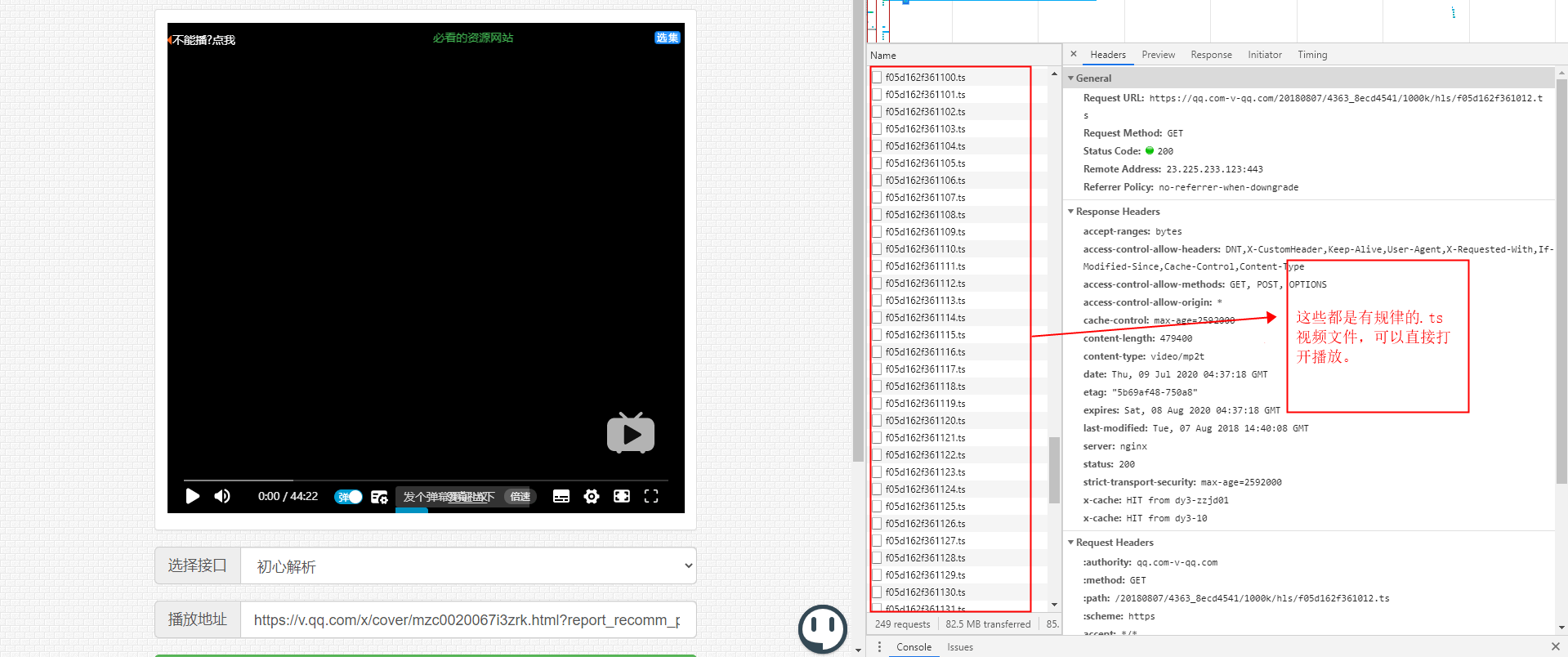
- 这些规律性文件都是由固定字符串+递增数字+.ts后缀组成,而这些文件连接起来就是整个视频。
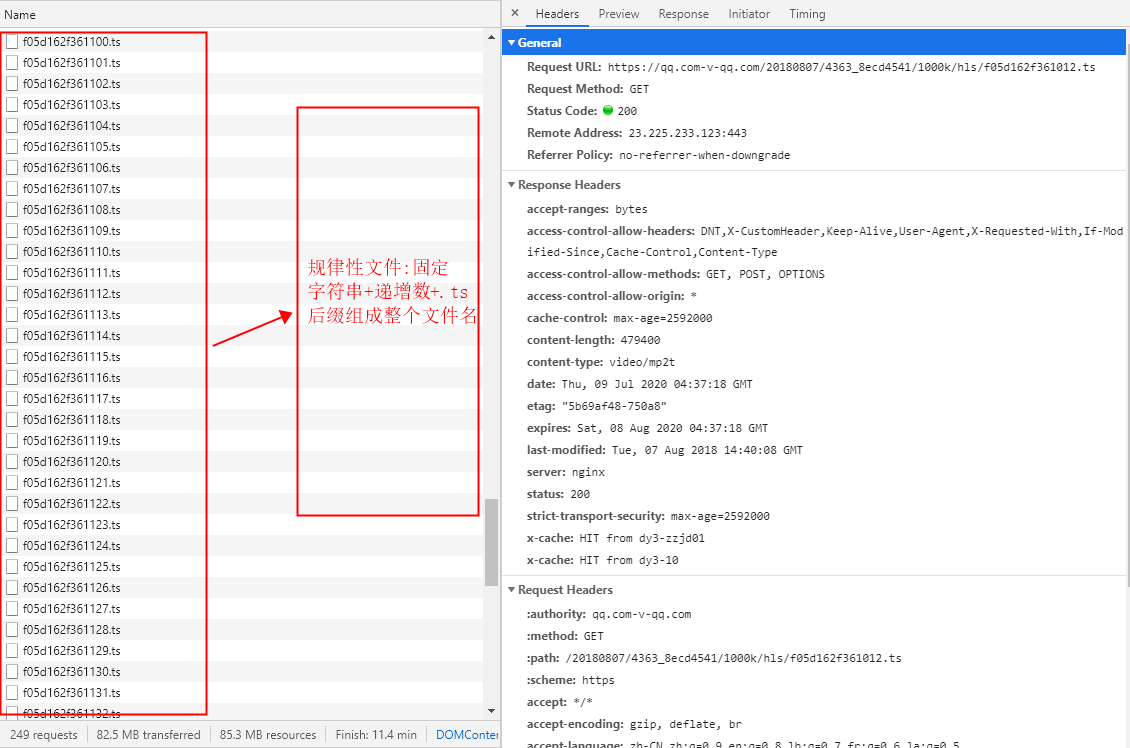
- 第五步,上代码,下载这些ts文件。
import requests
from queue import Queue
import threading
import time
start = time.process_time()

# 创建线程 生产者负责获取URL,并且解析URL


class Procuder(threading.Thread):
    headers = {
        'user-agent': 'Mozilla/5.0(WindowsNT10.0;Win64;x64)AppleWebKit/537.36(KHTML,likeGecko)'
                      'Chrome/76.0.3809.132 Safari/537.36'
    }

    def __init__(self, num_queue, ts_queue, *args, **kwargs):
        super(Procuder, self).__init__(*args, **kwargs)
        self.num_queue = num_queue
        self.ts_queue = ts_queue

    def run(self):
        while True:
            if self.num_queue.empty():
                # 如果队列为空就,线程执行完成,跳出死循环,结束run
                break
            url = self.num_queue.get()
            self.download_ts(url)

    def download_ts(self, url):
        r = requests.get(url)
        ret = r.content
        filename = url[-10:]
        self.ts_queue.put((ret, filename))


# 创建线程 消费者 负责下载
class Consumer(threading.Thread):

    def __init__(self, num_queue, ts_queue, *args, **kwargs):
        super(Consumer, self).__init__(*args, **kwargs)
        self.num_queue = num_queue
        self.ts_queue = ts_queue

    def run(self):
        while True:
            if self.ts_queue.empty() and self.num_queue.empty():
                # 如果队列为空就,线程执行完成,跳出死循环,结束run
                break
            ret, filename = self.ts_queue.get()
            # 将ts文件保存到文件夹里
            with open('E:/movies/{}'.format(filename), 'wb') as f:
                f.write(ret)
            print(filename + '  下载完成!')


def main():
    # 定义线程
    num_queue = Queue(2000)
    ts_queue = Queue(5000)
    for i in range(1001,1300):
        # https://douban.donghongzuida.com/20200714/5459_09deb8e9/1000k/hls/d09d5135dfd000001.ts
        url = "https://douban.donghongzuida.com/20200714/5459_09deb8e9/1000k/hls/d09d5135dfd%06d.ts" % i
        # print(url)
        num_queue.put(url)
    # 定义100个生产者
    # return
    for x in range(100):
        t = Procuder(num_queue, ts_queue)
        t.start()
    # 定义100个消费者
    for x in range(100):
        t = Consumer(num_queue, ts_queue)
        t.start()
    t.join()
    end = time.process_time()
    endTime=time.time()
    print('程序耗时: %6.3f' % (end - start))
    print('下载耗时: %6.3f' % (endTime - starTime))

if __name__ == '__main__':
    global starTime
    starTime=time.time()
    main()
1
2
3
4
5
6
7
8
9
10
11
12
13
14
15
16
17
18
19
20
21
22
23
24
25
26
27
28
29
30
31
32
33
34
35
36
37
38
39
40
41
42
43
44
45
46
47
48
49
50
51
52
53
54
55
56
57
58
59
60
61
62
63
64
65
66
67
68
69
70
71
72
73
74
75
76
77
78
79
80
81
82
83
84
2
3
4
5
6
7
8
9
10
11
12
13
14
15
16
17
18
19
20
21
22
23
24
25
26
27
28
29
30
31
32
33
34
35
36
37
38
39
40
41
42
43
44
45
46
47
48
49
50
51
52
53
54
55
56
57
58
59
60
61
62
63
64
65
66
67
68
69
70
71
72
73
74
75
76
77
78
79
80
81
82
83
84

- 最后一步,.ts文件合成高清MP4文件。在目录下开启cmd执行命令,或者创建run.bat文件,写入“copy /b *.ts test.mp4”,保存后点击运行即可。
#test.mp4 是自定义名称。
copy /b *.ts test.mp4
1
2
2